Pag-IBIG Portal: Virtual Pag-Ibig Registration, Login, Loans, MP2 Savings and Online Services
Access the Virtual Pag-IBIG Portal for Pag-IBIG online registration, login, Pag-IBIG loan information, and MP2 Savings. Learn about Pag-IBIG online services, Pag-IBIG MP2, and the Pag-IBIG Loyalty Card to better understand your membership and available benefits.

Need help with Virtual Pag-IBIG registration, login, loans, or MP2 Savings? This guide explains how to use the Pag-IBIG Portal, complete online registration, access your account, check loan details, and manage your savings without unnecessary confusion.
Whether you are a new member trying to get your Pag-IBIG MID number or an existing member checking loan information or MP2 Savings, you will find clear explanations of the main online services, the steps involved, and common issues you may encounter along the way.
What Is the Pag-IBIG Portal?
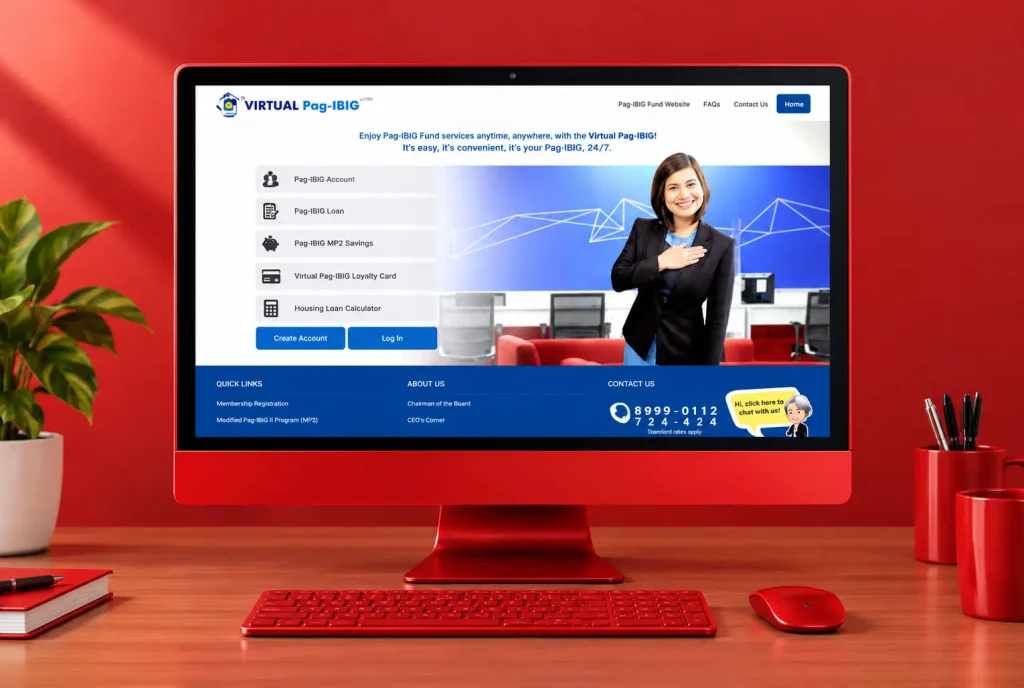
The Pag-IBIG Portal, officially called Virtual Pag-IBIG, is the online platform of the Home Development Mutual Fund (HDMF), the government agency Filipinos simply call Pag-IBIG Fund. It lets members handle their accounts without lining up at a branch. You can register, check your contributions, request loans, monitor your MP2 savings, and print important documents straight from your phone or computer.

Pag-IBIG itself started as a program to help Filipino workers save money and eventually own a home. Every employed member contributes a small percentage of their salary each month, and that money grows into savings the member can withdraw later or use as leverage for a housing loan. The Virtual Pag-IBIG portal is simply the digital front door to that entire system.
Many people search separately for “pag ibig online,” “pagibig login,” or “www.pagibigfund.gov.ph online registration” without realizing these all point to the same platform. Once you understand that Virtual Pag-IBIG is the single hub for almost everything, the rest of the process becomes much easier to follow.
Who Needs to Register on Virtual Pag-IBIG
Registration on the Pag-IBIG Portal applies to a wide range of people, not just office employees. Below are the common groups who typically need an account.
If you fall under any of these categories, having a Virtual Pag-IBIG account saves you multiple trips to a branch and lets you track everything in real time.
Pag-IBIG Online Registration: Step-by-Step Process
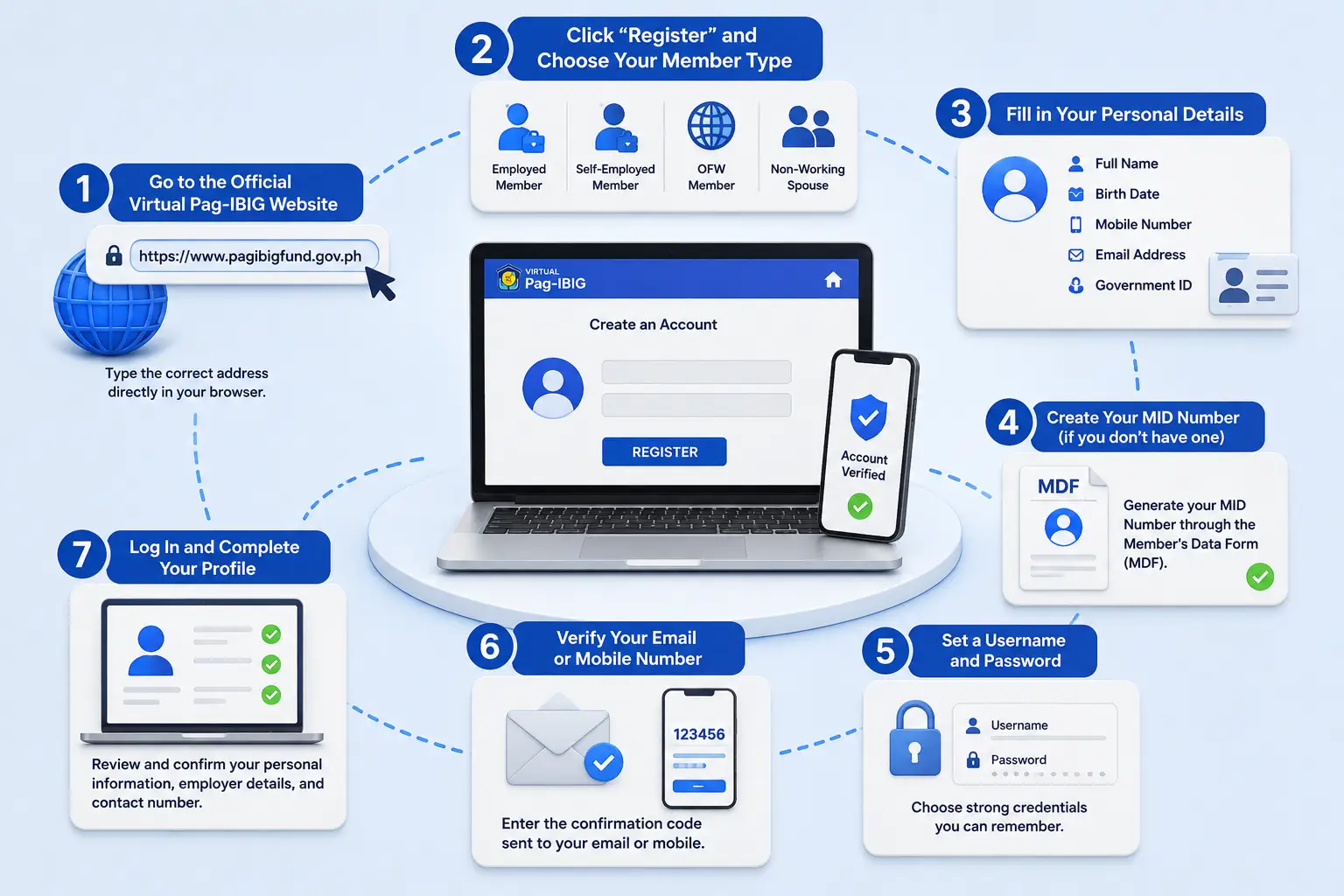
Signing up for the first time can feel confusing because the portal asks for details many first-timers do not have ready. Here is the process broken into clear steps.
Go to the official Virtual Pag-IBIG website
Type the correct address directly into your browser rather than clicking random links from search results, since fake pages exist.
Click “Register” and choose your member type
The portal separates employed members, self-employed members, OFWs, and non-working spouses, so pick the category that matches your situation.
Fill in your personal details
This includes your full name, birth date, mobile number, email address, and a valid government ID.
Create your MID number if you don’t have one yet.
First-time applicants without a Pag-IBIG number will be guided to generate one through the online Member’s Data Form (MDF).
Set a username and password
Choose credentials you can remember, since forgotten login details are one of the most common issues members report later.
Verify your email or mobile number
A confirmation code is sent, and you need to input it before the account becomes active.
Log in and complete your profile
Once verified, sign in and check that your personal information, employer details, and contact number are accurate.
Following these steps in order avoids the back-and-forth many members experience when they skip the verification step or misspell their registered email.
Requirements for Pag-IBIG Registration
Before you start, gather these documents so the process moves without interruption.
| Requirement | Why It’s Needed |
| Valid government-issued ID | Confirms your identity during registration |
| Active mobile number | Used for OTP verification and account recovery |
| Personal email address | Needed for confirmation links and updates |
| Employer information (if employed) | Links your contributions to the correct company record |
| Existing Pag-IBIG number (if any) | Prevents duplicate registration |
Having these ready before you sit down to register can cut the entire process down to fifteen minutes instead of an hour of searching for documents midway.
Understanding the Pag-IBIG MID Number
Your Membership ID, commonly called the MID number, is the unique identifier tied to your entire Pag-IBIG record. Without it, the system cannot match your contributions, loans, or savings to your profile.
Members often search “how to get pag ibig number” or “how to know my pag ibig number” because this detail gets lost, especially among those who registered years ago and forgot to save it. There are a few reliable ways to retrieve or verify it.
If you registered online recently, your MID number usually appears on your registration confirmation page or email, so check there first before assuming it’s lost.
How to Log In to Virtual Pag-IBIG
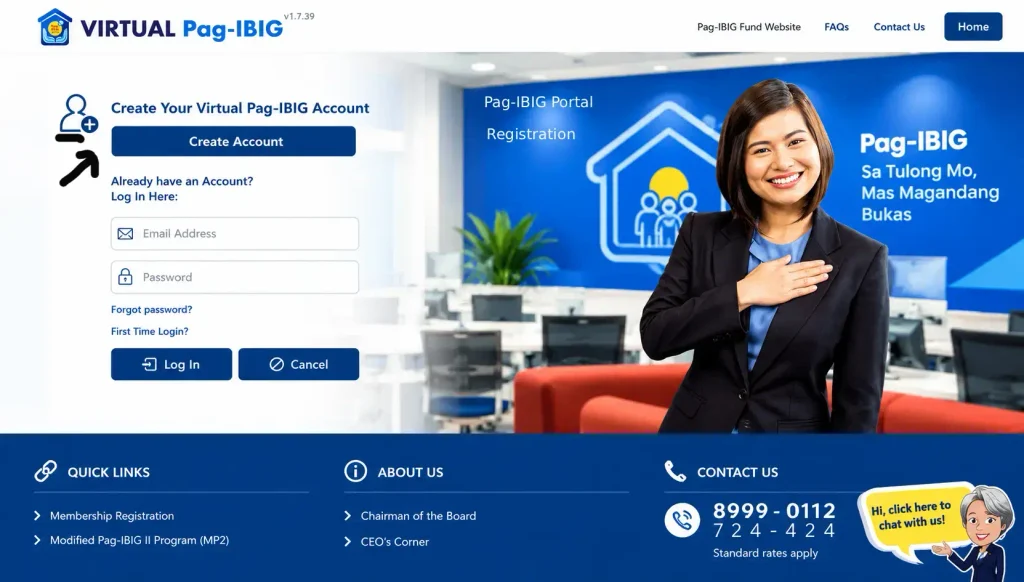
Once your account is active, logging in becomes routine, but a few details trip up new users.
Visit the Virtual Pag-IBIG login page and enter your registered username or MID number.
Type your password carefully, since the field is case-sensitive.
Complete any additional verification if prompted, such as an OTP sent to your phone.
Once inside, you land on your dashboard showing contributions, loan status, and savings summary.
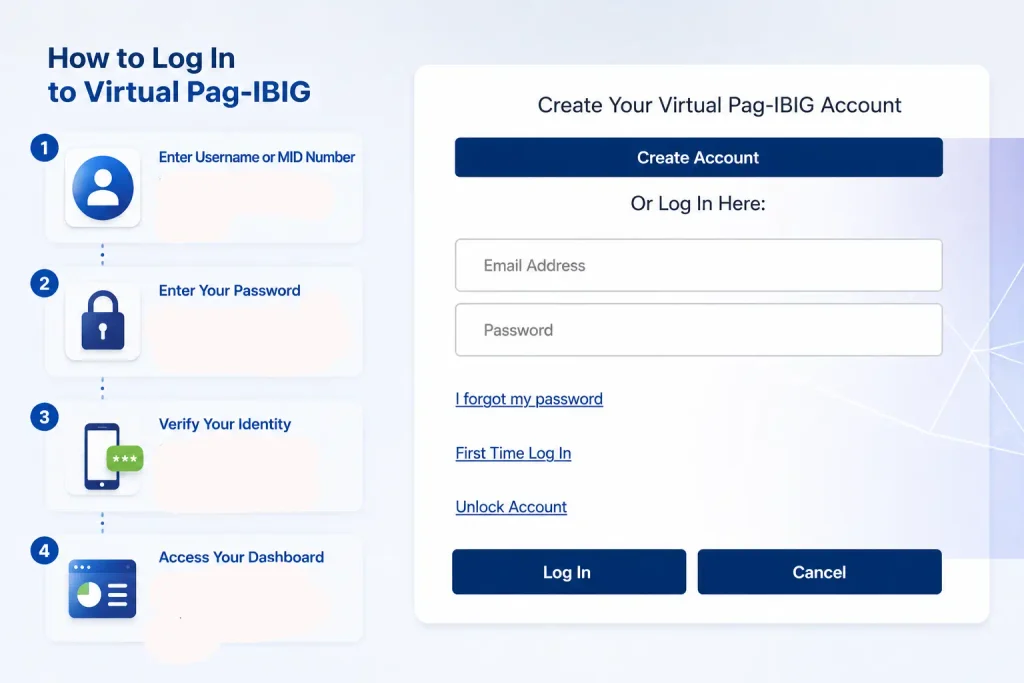
If login fails repeatedly, it usually points to an expired session, a mistyped password, or an account that was never fully verified after registration. Resetting your password through the “Forgot Password” link solves most of these cases within minutes.
Creating a Strong Password for Your Virtual Pag-IBIG Account
Your password is the only thing standing between your Pag-IBIG account and unauthorized access, so choosing it wisely matters. Avoid using obvious details like your birth date, MID number, or a simple sequence of numbers. Instead, combine uppercase letters, lowercase letters, numbers, and a special character to create something that would take significant effort to guess. Write it down on paper kept in a secure location.
Recovering a Lost or Forgotten Password
The portal includes a straightforward password recovery tool accessible directly from the login page. Click “Forgot Password,” enter your registered email or mobile number, and follow the verification instructions sent to your email. Once verified, you can create a new password immediately. However, if you no longer have access to your registered email or mobile number, contacting the Pag-IBIG hotline or visiting a branch becomes necessary, and this process takes noticeably longer than self-service recovery.
Checking and Understanding Pag-IBIG Contributions
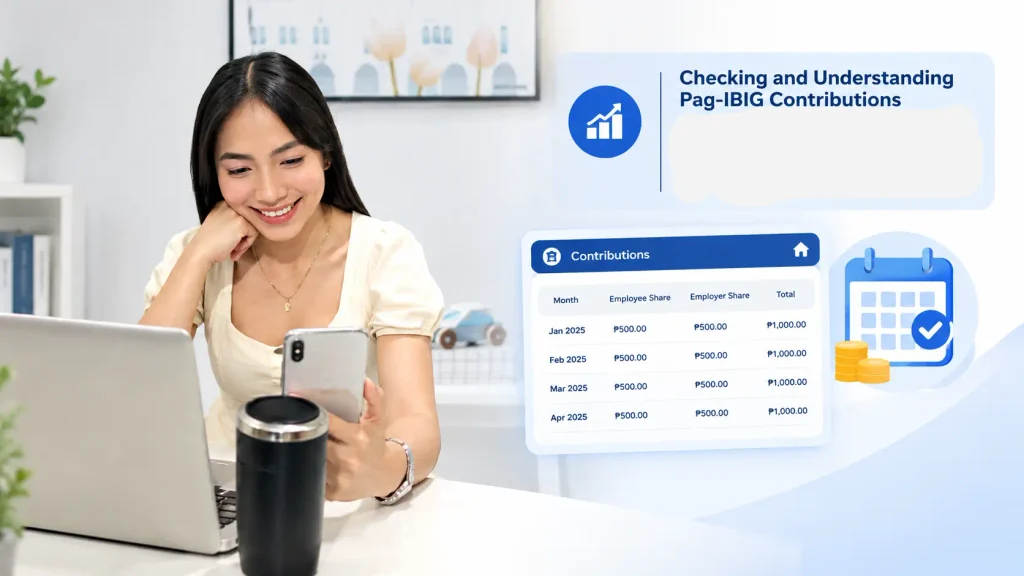
Your monthly contribution is the foundation of your entire Pag-IBIG record, and the portal lets you monitor it without waiting for a printed statement.
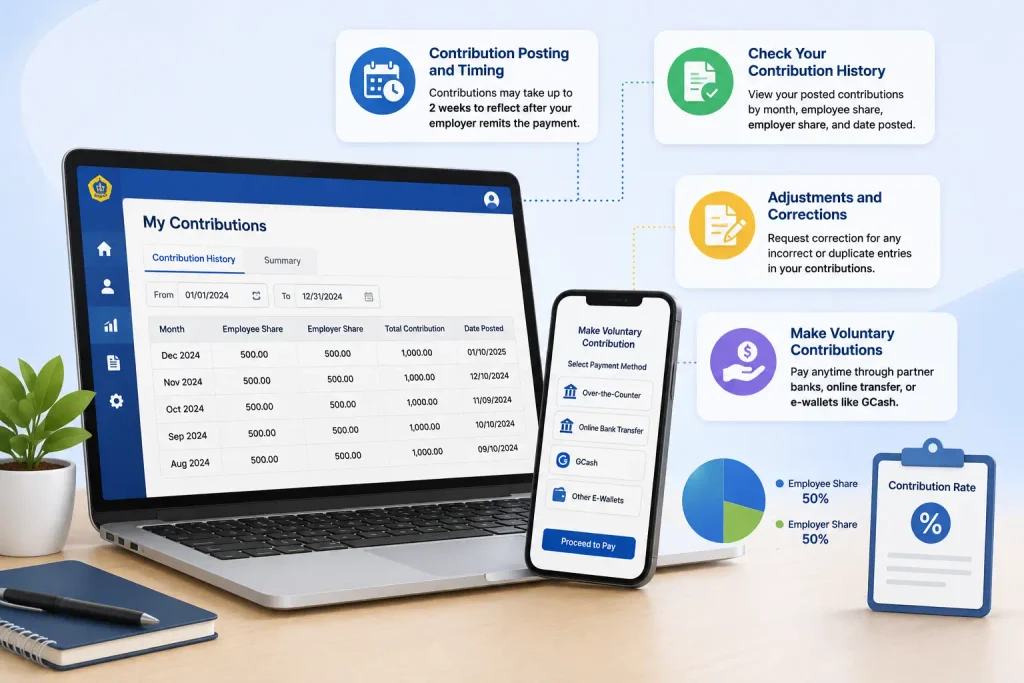
The standard contribution rate follows a percentage of your monthly salary, split between the employee’s share and the employer’s share for those formally employed. Self-employed and voluntary members shoulder the full amount themselves, based on the income bracket they declare during registration. The updated contribution table for the current year is published directly on the official portal, so always check there for the latest figures rather than relying on outdated screenshots circulating online.
To check your contribution history, log in to Virtual Pag-IBIG, go to the contributions section, and select the date range you want to review. The system displays each posted contribution along with the corresponding month, making it easy to spot any gaps that might affect your loan eligibility later.
Contribution Posting and Timing
Contributions deducted from an employee’s salary do not post immediately to the portal. After your employer remits your contribution to Pag-IBIG. Members searching their contribution history anxiously right after their salary date will not see the payment reflected yet, so understanding this lag prevents unnecessary calls to the hotline. If a contribution fails to post after two weeks, contact your HR department to verify they submitted the remittance on time, since employer delays are the usual culprit behind posting delays.
Contribution Adjustments and Corrections
Occasionally, a contribution posts incorrectly due to an employer error, a payroll department mistake, or a duplicate entry. Document the incorrect entry with the date and amount, describe what the correct entry should be, and submit. Processing times for corrections vary, but most requests resolve within ten business days.
Making Voluntary Contributions
Members not participating in automatic payroll deduction can make voluntary contributions directly through the portal using various payment channels. Over-the-counter payment at a partner bank, online bank transfer, and mobile money platforms like GCash are all accepted. Voluntary contributions offer flexibility, particularly for self-employed individuals, freelancers, and those between jobs who want to maintain their membership without employment-based deductions.
The Member’s Data Form (MDF): What It Is and How to Get One
The Member’s Data Form, or MDF, is the document Pag-IBIG uses to record or update your personal information. New members fill it out to generate their MID number, while existing members use it to correct details like a name change or updated address.
Getting an MDF has become far simpler through the portal. New applicants complete it directly online during registration, and the system auto-generates a reference number once submitted. Existing members who need a copy for employer submission or record correction can request one through the portal’s document request feature or download the fillable form from the official downloadable forms page.
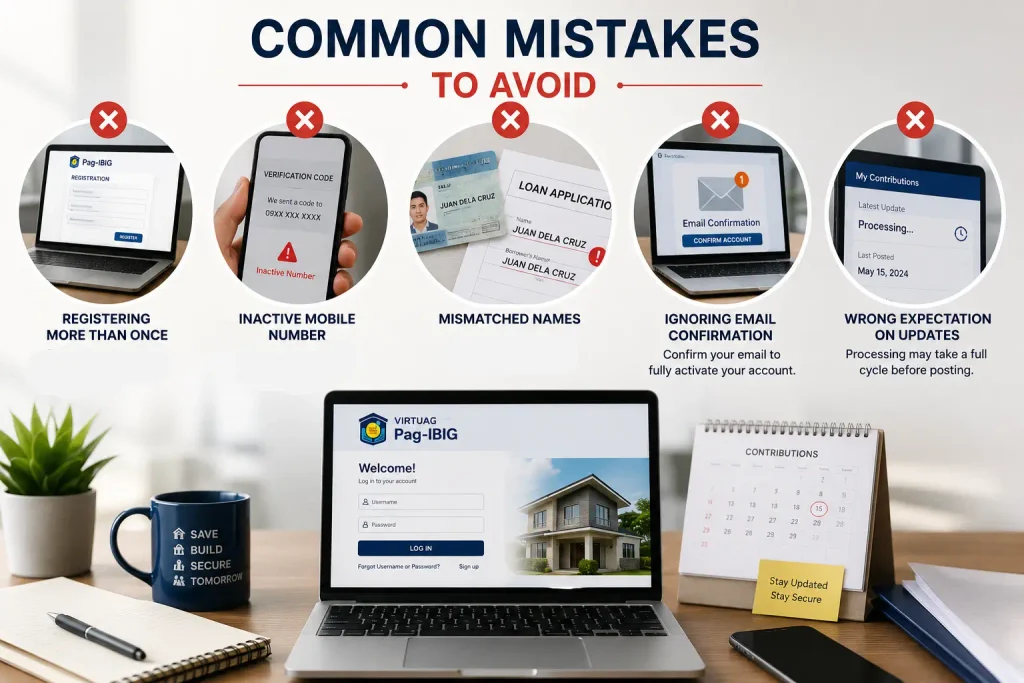
A common mistake is submitting an MDF with mismatched details between the online form and a supporting ID. Double-check spelling, birth date format, and civil status before submitting, since corrections after processing take noticeably longer than getting it right the first time.
Pag-IBIG Loans Through the Portal
Loan applications make up a large share of what members search for, and the portal now supports several loan types entirely online. Each loan serves a different purpose, so knowing which one fits your situation avoids wasted applications.
Multi-Purpose Loan (MPL)
The Multi-Purpose Loan lets qualified members borrow against their accumulated savings for personal needs such as minor home repairs, tuition, or medical expenses. Eligibility depends on your total contributions, and the amount you can borrow is calculated as a percentage of your total value.
Housing Loan
The Housing Loan remains Pag-IBIG’s flagship product, designed to help members purchase, construct, or renovate a home. This one involves a longer process with property appraisal, income verification, and a formal application, so members usually need to visit a branch even after starting the process.
Salary Loan
Often called the Pag-IBIG Salary Loan, this option lets employed members borrow based on their monthly compensation and length of contribution. It processes faster than housing loans since the required documentation is lighter.
Calamity Loan
The Calamity Loan opens specifically after a declared calamity in an affected area, giving members quicker access to funds for recovery. Applications typically require proof of residence or employment in the calamity-declared zone alongside standard loan documents.
How to Apply for a Loan Online
Log in to Virtual Pag-IBIG and select the loan type from your dashboard.
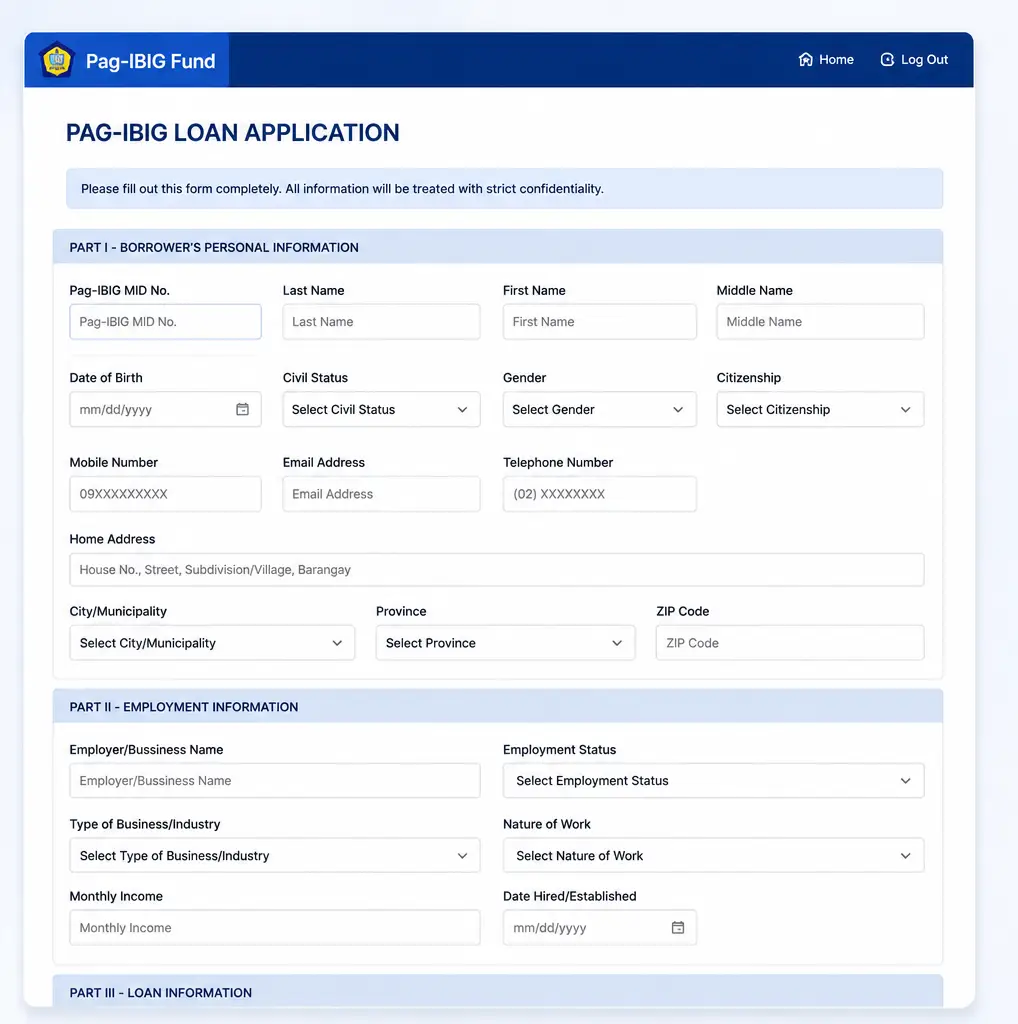
Fill in the required loan application form with accurate personal and financial details.
Upload the supporting documents requested, such as valid ID and proof of income.
Submit and wait for the system to generate a reference or tracking number.
Monitor your loan status regularly through the portal until it reflects as approved or released.
The online loan application process streamlines what used to require a full branch visit and waiting in a queue. However, having all required documents prepared before you log in prevents the common frustration of starting an application only to discover you cannot finish it without a document you left at home.
Loan Eligibility and Borrowing Limits
Your eligibility for any Pag-IBIG loan depends primarily on three factors: your total contribution history, your current contribution status, and the specific loan type you are applying for. To qualify for a Multi-Purpose Loan (MPL), a member generally needs at least 24 months of membership savings and at least one monthly savings contribution within the six months before applying, along with other applicable requirements.
The maximum loan amount you can borrow is calculated as a percentage of your accumulated savings or monthly salary, depending on the loan type. The portal usually displays this calculation on the loan application form itself, so you know the upper limit before filling out the application. Attempting to borrow beyond this limit results in an automatic rejection, so understanding this limit before hand prevents wasted applications.
Checking Your Pag-IBIG Loan Status and Processing Timeline
Once submitted, members frequently search “pag ibig loan status” hoping for instant confirmation, but processing takes time. Log in to the portal, go to the loan tracking section, and enter your tracking number if prompted. Statuses typically move from “received” to “under evaluation” and finally to “approved” or “released,” and each stage can take several business days depending on current application volume.
For multi-purpose loans, expect the evaluation stage to last between three to five business days, after which you receive notification of approval or rejection. Salary loans follow a similar timeline. Housing loans, by contrast, involve property appraisal and income verification processes that routinely extend the timeline to two to three weeks or longer.
Understanding Loan Denial and Reapplication
Loan applications occasionally get denied for reasons ranging from incomplete documents to insufficient contribution history or a debt-to-income ratio deemed too high by Pag-IBIG standards. The portal notification should specify the reason, though sometimes the explanation is vague enough that calling the hotline for clarification becomes necessary. Once you address the issue causing the denial, reapplication is straightforward, and many members successfully approve their second attempt .
Loan Vouchers and Money Release Methods
Once your loan is approved, Pag-IBIG releases the funds through one of several methods depending on the loan type and your preference. Some loans are released directly to a bank account via electronic transfer, which is the fastest method and eliminates the need to physically pick up a check. Others still use printed loan vouchers that you carry to a partner bank or Pag-IBIG office to withdraw in cash. Ask about your options at the time of approval rather than assuming you know how your funds will arrive.
MP2 Savings: A Simple Explanation
The Modified Pag-IBIG II Savings Program, known as MP2, is a voluntary savings option offering higher dividend rates than the regular contribution. Any active or former Pag-IBIG member can enroll, and there’s no requirement to have an existing housing loan or MPL to participate.
- Log in to Virtual Pag-IBIG and locate the MP2 savings section.
- Choose your desired monthly contribution amount, since MP2 has no fixed maximum.
- Select your payment method, whether through payroll deduction, over-the-counter payment, or online banking channels.
- Confirm enrollment and save your MP2 account reference for future tracking.
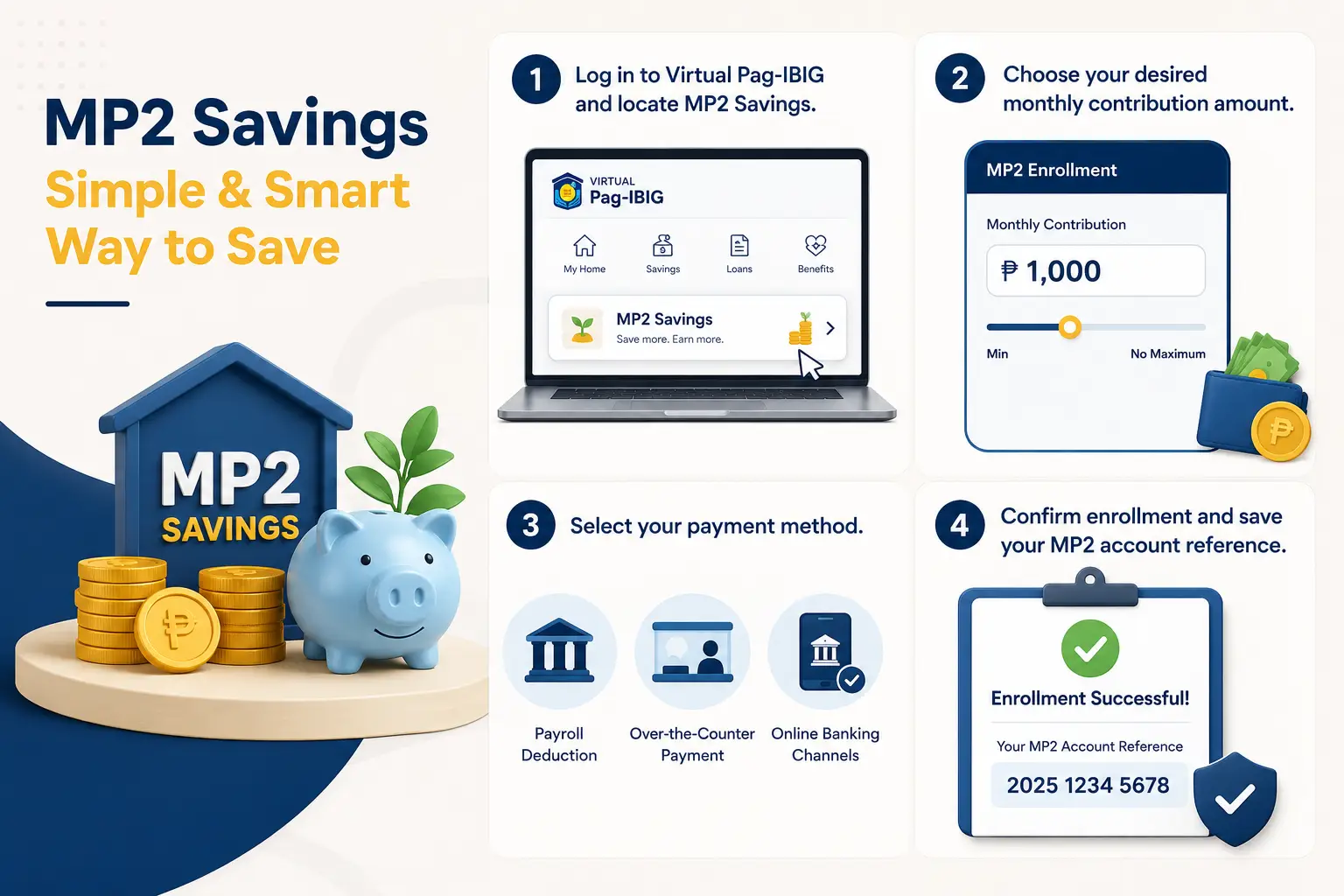
To check your MP2 balance, return to the same section anytime and view your accumulated savings along with the dividend earned for the year. Many members treat MP2 as a low-risk, government-backed alternative to traditional savings accounts because of its consistently competitive dividend history.
Downloadable Pag-IBIG Forms and Document Management
The portal hosts a repository of downloadable forms covering everything from member data updates to loan applications and employer certifications. Accessing these forms is straightforward: log in, navigate to the forms section, and select the specific form you need. Common forms include the MDF (Member’s Data Form) for registration and updates, various loan application forms for each loan type, the Loyalty Card Plus application, MCIF forms for employer coordination, and ESRS templates for company representatives.
Having digital copies of these forms on your computer or phone before you need them prevents the frustration of scrambling to find the right document when a deadline approaches. Many members download and review forms ahead of time, familiarizing themselves with what information is required before they commit time to completing the full application. Printable versions are available directly from the portal, and some branches accept digital copies submitted online, though this varies by location and form type.
Pag-IBIG ID and Loyalty Card
The Pag-IBIG Loyalty Card Plus functions both as your official Pag-IBIG ID and as a prepaid card linked to a partner bank. It replaced the older Pag-IBIG ID system and now serves as proof of membership when transacting at any branch.
To get one, visit a Pag-IBIG branch personally since biometric capture is required and cannot be completed online. Bring your valid ID and MID number, fill out the loyalty card application form, and wait for the card to be printed or mailed, depending on the branch’s current process. Processing time varies by location, so calling ahead to confirm availability saves you an unnecessary trip.
Using Your Loyalty Card for Loans and Transactions
The Loyalty Card Plus carries your MID number and personal details, making it the fastest form of identification when applying for loans at a branch or requesting documents. Some members find it easier to present the card than to locate and present their government ID, particularly when handling urgent transactions. However, carrying your card anywhere requires the same security precautions you would take with any payment card, since a lost or stolen card involves cancellation and reissuance procedures.
Pag-IBIG Employer Portal and ESRS
Employers use a separate section of the portal called the Employer’s Self-Service Reporting System (ESRS) to remit employee contributions and manage company records. Through ESRS, an authorized company representative can generate the Monthly Remittance Report, update employee records, and submit loan-related employer certifications.
Setting up ESRS access requires the company’s Pag-IBIG employer number and a formal registration process distinct from individual member registration. HR personnel handling this for the first time should coordinate directly with their assigned Pag-IBIG branch to confirm the exact documentary requirements, since these can differ slightly depending on company size and industry.
Common Problems Members Face on the Portal
Even with a straightforward process, certain issues repeat often enough to deserve their own section.
Forgotten MID Number or Login Credentials
A forgotten MID number is more common than you might think, especially among members who registered years ago and never saved the number. Your first step should be checking any old Pag-IBIG documentation, loyalty card, or employment records where the number might be printed. If nothing surfaces, use the portal’s MID verification feature by entering your personal details, or call the hotline with your government ID for assistance.
For login credentials, use the
“Forgot Password”
link on the login page and follow the email verification process to reset your password immediately.
OTP Not Received During Registration or Login
An OTP (One-Time Password) sent to your phone is a critical verification step, and when it fails to arrive, the account verification process stalls. The most common cause is an outdated mobile number registered with your account. If you switched phones or SIM cards, update your mobile number through your account settings before requesting a new OTP. If the number is current, check your message inbox for any SMS that may have arrived with a delay, as network congestion occasionally affects delivery. Requesting the OTP multiple times rapidly can sometimes trigger a temporary block; waiting a few minutes before trying again often resolves this.
Loan Application Stuck in Evaluation for Days
A loan application that remains “under evaluation” for significantly longer than expected—typically more than a week for non-housing loans—often signals missing or unclear documentation. Check the application status details closely for any note about documents requiring clarification or resubmission. Contact the Pag-IBIG hotline with your loan tracking number to ask specifically what documents, if any, are causing the delay. Proactively resubmitting a clearer scan of a document that seemed unclear can sometimes accelerate the process.
Contribution Not Reflecting in the Portal
When a month’s contribution does not appear in your portal history within the expected timeframe, first verify with your employer’s HR department that they actually submitted the remittance on time. Payroll departments occasionally hold contributions pending approval or encounter banking delays. If the employer confirms timely submission, contact Pag-IBIG with proof of the company’s submission record, and they can investigate whether the contribution was received but not posted due to a system issue.
Duplicate Registration
Registering twice instead of recovering an existing account creates duplicate records that confuse the system and can affect loan applications later. If you suspect you have two accounts, use the portal’s account recovery feature to locate your original account rather than creating a new one. Once you log into the original account, contact the hotline to report the duplicate so they can merge the records or delete the extra account to prevent future conflicts.
Common Mistakes to Avoid
A few small errors cause most of the delays members experience with the Pag-IBIG Portal.
Practical Tips for a Smoother Experience
Keep a personal record of your MID number, registered email, and tracking numbers the moment you receive them, since retrieving lost details later takes far more effort than saving them upfront. Update your mobile number on the portal immediately if you switch SIM cards, because OTP verification depends entirely on that number being active. When applying for any loan, prepare digital copies of your documents beforehand so uploading them doesn’t stall halfway through the application.
Check the portal during off-peak hours, typically early morning or late evening, if you experience slow loading during peak transaction periods. Finally, always cross-check any contact number or link claiming to be Pag-IBIG against the official website, since fraudulent pages imitating the portal do exist.
Organizing Your
Pag-IBIG Documents
Create a folder on your computer or phone containing scanned copies of your valid ID, recent payslips, proof of residence, employment certificate, and any other documents Pag-IBIG typically requests. Having these organized and easily accessible means you never delay a loan application or ID request because you cannot locate a single document. Members find that reviewing these documents before submitting an application also catches spelling errors.
Setting Reminders for
Important Deadlines
If you are waiting for loan approval, a loyalty card to arrive, or contribution history to update, set a reminder on your calendar for the expected completion date. Checking proactively on that date rather than waiting for notification often surfaces delays that can be addressed immediately rather than after they become major issues. Passive waiting frequently leads to missed deadlines or forgotten transactions that affect your member record later.
Using the Portal on
Mobile vs. Desktop
The Virtual Pag-IBIG portal is optimized for both mobile phones and desktop browsers, but some users find that loan applications and lengthy forms are easier to complete on a larger desktop screen where they can see more fields at once. Mobile access excels for quick tasks like checking contribution history or tracking loan status, while desktop access works better for comprehensive applications with multiple document uploads. Choose the device that fits the task.
Special Circumstances and Specific Member Scenarios
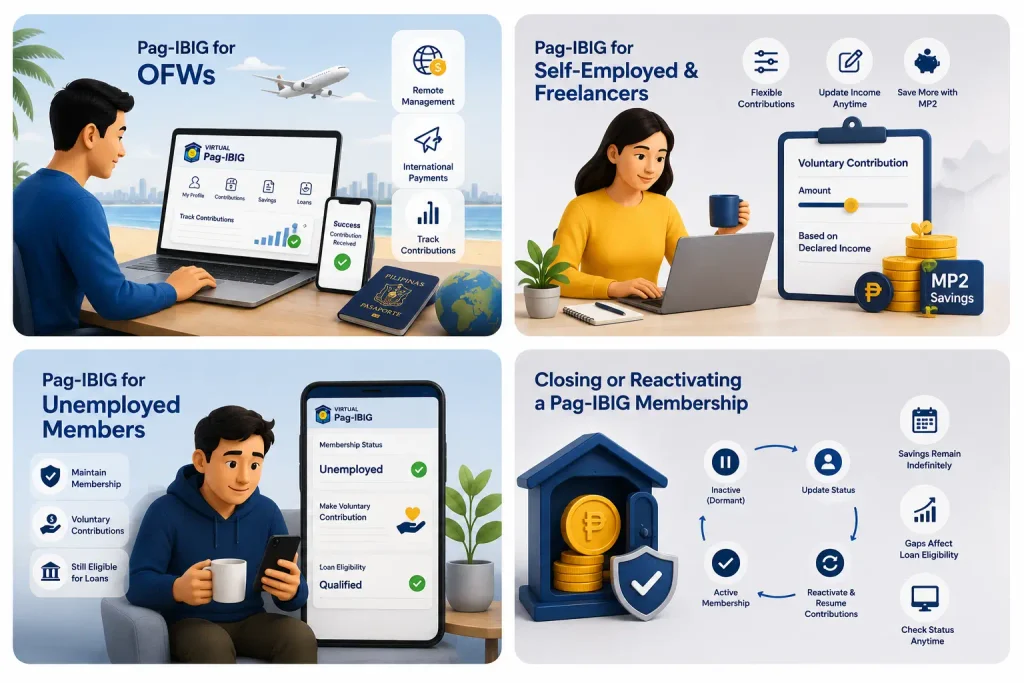
Pag-IBIG for OFWs (Overseas Filipino Workers)
Overseas Filipino Workers maintaining Pag-IBIG membership can manage their accounts remotely through the Virtual Pag-IBIG portal, though certain transactions like loyalty card issuance require visiting a branch or arranging a proxy representative. OFWs typically register under the OFW member category during initial signup, and can make voluntary contributions through international money transfer services or over-the-counter payment methods. The portal allows OFWs to track contributions remitted by their employers abroad or contributions they made personally while overseas.
Pag-IBIG for Self-Employed and Freelancers
Self-employed members and freelancers choose voluntary contribution amounts based on their declared income, offering flexibility compared to employed members with fixed deductions. They can adjust contribution amounts as their income fluctuates, though this requires updating their income information through the portal or at a branch. Self-employed members often use MP2 as a savings complement since they have direct control over how much they set aside monthly.
Pag-IBIG for Unemployed Members
Unemployed members can maintain their membership through voluntary contributions and still qualify for loans as long as they have sufficient accumulated savings. The portal allows unemployed status registration, though the member type selection requires accuracy during the initial signup. Once unemployed status is established, members can make voluntary contributions at any amount they can afford without waiting for employment to resume.
Closing or Reactivating a Pag-IBIG Membership
Members who stop contributing for an extended period do not lose their accumulated savings; the money remains in their account indefinitely. However, gaps in contribution history affect loan eligibility. Reactivating a dormant membership through the portal or a branch involves updating status and resuming contributions. The portal tracks membership status clearly, so members always know whether their account is currently active or inactive.
Pag-IBIG Contact Information and Branch Visits
For concerns the portal cannot resolve, members can reach the Pag-IBIG hotline for assistance with account verification, loan inquiries, and general concerns. Branch visits remain necessary for biometric-based transactions like loyalty card issuance or certain housing loan document submissions. Office hours generally follow standard government working days, though some branches extend service on select Saturdays, so checking your specific branch’s schedule beforehand is worth the extra minute.
The main Pag-IBIG office in Manila serves as the hub for complex inquiries and policy questions, while provincial branches handle routine transactions and provide direct member assistance. Many branches now accept email inquiries and online appointment scheduling, reducing wait times compared to walk-in visits during peak hours.
Frequently Asked Questions
Conclusion
The Pag-IBIG Portal exists to remove the long lines and repeated branch visits that used to define dealing with government agencies in the Philippines. Once you understand the registration flow, know where to find your MID number, and get comfortable navigating your dashboard, most transactions become a matter of minutes rather than a whole afternoon. Keep your details updated, save your reference numbers, and use the official channels only, and the portal becomes one of the more convenient government services available to Filipino members today.